
 See Our Latest Article on HelloNation
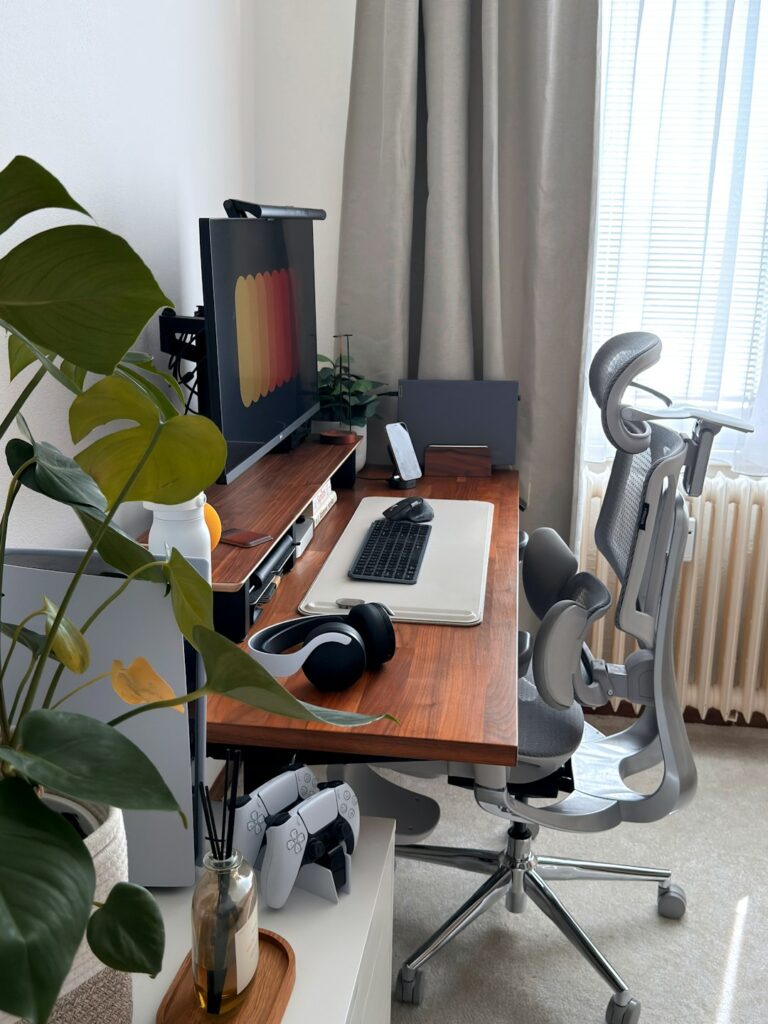
Why office work can lead to aches and stiffness
Office work is not physically demanding in the same way as lifting or construction, but long periods of sitting, typing, screen use, and reaching can still place stress on the neck, shoulders, wrists, hips, and lower back. The main issue is often not one “bad” posture. It is staying in one position too long without enough movement or adjustment.
For residents of DeWitt, seasonal routines can make this more noticeable. Cold winter weather may encourage longer periods indoors, while working from a kitchen table, couch, or temporary home-office setup can make it harder to maintain comfortable alignment.
Common complaints include:
- Neck tightness or headaches
- Aching between the shoulder blades
- Lower-back discomfort after sitting
- Wrist or forearm fatigue
- Hip stiffness when standing after work
- Tingling or numbness in the hands, arms, or legs
These symptoms may come from muscle fatigue, joint irritation, repetitive movements, or pressure on nerves. Persistent or worsening symptoms deserve individual evaluation rather than simply trying to “sit up straighter.”
How should a computer workstation be arranged?
A comfortable workstation allows the head, spine, arms, and legs to remain supported without forcing the body into a rigid position. The goal is a neutral posture that can be changed easily throughout the day.
Start with the chair:
- Keep both feet supported on the floor or on a stable footrest.
- Adjust the seat so the knees are approximately level with, or slightly lower than, the hips.
- Use the backrest to support the lower and middle back.
- Keep the shoulders relaxed instead of lifting them toward the ears.
- Leave enough room behind the knees so the edge of the chair does not create pressure.
The monitor should be directly in front of the body rather than off to one side. Its height should allow the head to remain balanced without repeatedly bending forward. A screen that is too low often encourages the chin to drift toward the chest, while a screen placed too far away may lead to leaning.
Keep the keyboard and mouse close enough that the elbows remain near the sides. Wrists should stay relatively straight instead of bent upward or angled outward. Frequently used items should be within easy reach so the upper body does not repeatedly twist or overextend.
Is standing at work better than sitting?
Standing is not automatically healthier than sitting, and standing still for many hours can also cause fatigue. The most useful approach is to alternate positions and include brief periods of walking.
A person might sit for focused computer work, stand during a phone call, walk while reviewing a short document, and return to sitting for detailed tasks. Even small changes reduce the time spent loading the same tissues in the same way.
A sit-stand desk can be useful if it is adjusted properly. The screen should rise with the work surface, and the keyboard should remain close to the body. Standing should not create a new problem such as locked knees, elevated shoulders, leaning into one hip, or bending the neck toward the monitor.
How often should office workers take movement breaks?
Brief, regular movement breaks are generally more helpful than waiting until pain becomes intense. A short pause about once every hour can reduce discomfort for many computer users, especially when it includes standing, walking, or changing tasks.
A practical office routine may include:
- Standing during the next phone call
- Walking to refill water
- Rolling the shoulders gently several times
- Looking away from the screen and relaxing the eyes
- Extending the hips and legs after a long meeting
- Switching between keyboard, reading, filing, and other tasks

The break does not need to be strenuous. The purpose is to interrupt static loading and restore normal movement. Stretching should feel mild and controlled. Forceful bouncing, aggressive neck circles, or stretching into sharp pain is not necessary.
What exercises are reasonable during the workday?
Simple movements can help maintain mobility, but exercises should be adapted to a person’s symptoms and physical condition. Useful options include gentle walking, repeated sit-to-stand movements, shoulder blade squeezes, and controlled upper-back extension over the back of a chair.
For neck tension, slowly turning the head from side to side may be comfortable, provided the movement is smooth and pain-free. For stiff hips, standing and taking several easy steps may be more useful than holding a long stretch.
Exercise outside work also matters. Regular walking and appropriately progressive strengthening can support the muscles used for sitting, lifting, and daily activity. People with recurring back pain may benefit from guidance on abdominal, hip, and back strengthening rather than relying only on passive treatments.
A common misconception is that exercise should be avoided whenever the back or neck is uncomfortable. In many cases, gentle activity is preferable to prolonged bed rest. However, a movement that causes increasing pain, weakness, numbness, or symptoms traveling down an arm or leg should be stopped.
Does chiropractic care replace workstation changes?
Chiropractic care and ergonomic changes address different parts of the problem. Manual care may be used as part of a broader plan for certain musculoskeletal complaints, but it does not correct a monitor placed too low, a chair without support, or a workday with no movement breaks.
The most durable improvement often comes from combining several habits:
- Adjusting the workstation
- Changing position regularly
- Building general strength and mobility
- Managing workload and recovery time
- Learning which movements aggravate or relieve symptoms
Posture is also not a fixed position that must be maintained perfectly. Even an excellent posture can become uncomfortable if held for hours. Comfort usually improves when the body has permission to move and the workstation can be adjusted to fit the person rather than forcing the person to fit the furniture.
When should office-related pain be evaluated?
Mild stiffness that improves with movement and rest may respond to reasonable workstation changes. Evaluation becomes more important when symptoms persist, interfere with sleep or normal activities, or continue despite several days of modifying work habits.
Prompt medical attention is appropriate for new or worsening weakness, significant numbness, loss of coordination, severe pain after an injury, fever with back pain, unexplained weight loss, or changes in bladder or bowel control. Pain that travels down an arm or leg, especially with weakness or progressive numbness, should not be dismissed as ordinary desk tension.
For local residents working from home, in a hybrid setting, or in a traditional office, the most useful first step is often a simple workstation review. Check the screen height, chair support, keyboard distance, foot position, and the amount of uninterrupted sitting. Small environmental changes are more likely to help when they are paired with frequent position changes and regular movement.
